
Artlume: AI Video Gen
Uğur CebeciArt & Design
0.00.00 Reviews
- Version
- 1.0.0
- Installs
- 10.00K
- Age Rating
- Mature 17+
Screenshots
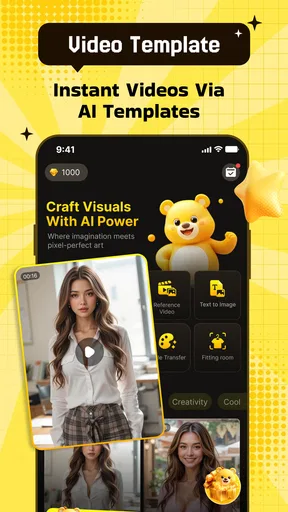
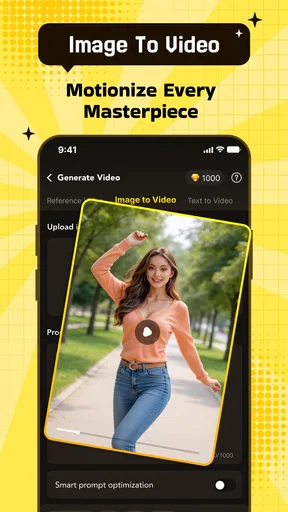
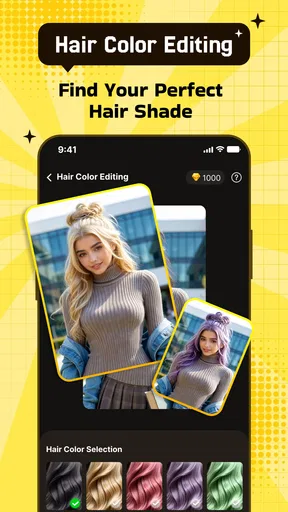
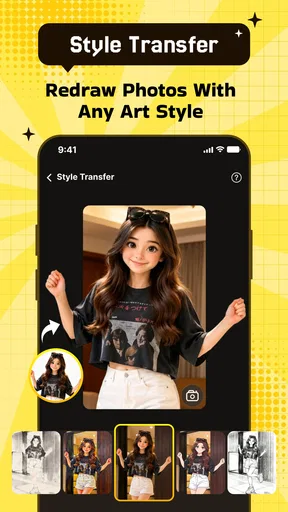
Our Review of Artlume: AI Video Gen
 Analysis by Appyee
I approached Artlume: AI Video Gen as a practical tool for turning still images into short, expressive video pieces rather than as a full video-editing suite. That distinction matters. If you want to give a portrait, travel photo, product image, or artwork a more animated presentation, the app is aimed at that moment. Its focus sits between photo editing and lightweight motion design, with creative effects, templates, and editing controls gathered around AI-generated video results.
My first impression is that Artlume is easiest to understand when you begin with a specific visual goal. Instead of opening it and hoping an effect will suggest an idea, I would decide whether I want a photo to feel cinematic, playful, dramatic, or suitable for social sharing. That small change in approach makes the experience more efficient because the source image, template choice, and amount of editing all affect whether the final result feels intentional or merely busy.
How to Decide Whether Artlume Fits Your Workflow
The app belongs to the Art & Design category, but its appeal is broader than drawing or static image creation. I see it as a bridge for people who already have visual material and want to add movement without learning a traditional timeline editor. It may suit a casual creator preparing a post, an artist making a visual teaser, or someone who wants to bring an old photograph to life in a more expressive format.
Before choosing it, I would ask three questions. Do I mainly start with photos? Am I comfortable letting an automated system interpret the mood and movement of an image? And do I need a quick result more than precise control over every frame? If the answer to all three is yes, the app has a sensible place in your toolkit.
If your priority is manual animation, exact keyframes, detailed sound mixing, or frame-by-frame correction, I would look toward a conventional mobile video editor instead. Artlume’s attraction is the shortcut from an existing image to a moving visual. That shortcut is useful, but it also means the app is not necessarily the best choice for someone who wants to direct every technical detail.
The developer is Uğur Cebeci, and the app is available at no upfront cost. It has reached over ten thousand installs, which gives it some early visibility without making it feel like an established mainstream editor. The current release is version 1.0.0, so I would approach it as a focused, relatively early product and judge it by whether its central workflow matches my needs rather than expecting the depth of a mature desktop-style application.
Device compatibility is also straightforward for many users: Artlume requires Android 7.0 or later. That makes it accessible on a wide range of Android phones, although the quality of the experience will still depend on the phone’s screen, storage, processing ability, and the complexity of the chosen generation task. A compatible operating system does not automatically mean every device will feel equally quick or comfortable.
Choosing the right source image
One of the less obvious decisions happens before the first effect is selected. A clear image with a strong subject usually gives the app more useful visual information than a crowded photograph containing several competing focal points. For a portrait, I would leave enough space around the face and shoulders. For a landscape, I would avoid an image where the horizon is already tilted unless that angle is part of the intended style.
This is not just a matter of image quality. AI motion can make weak composition more noticeable. A busy background may become distracting once movement is added, while a simple subject can look more deliberate with only a restrained effect. I would prepare two or three possible source images and compare them before spending time refining a template.
A practical workflow is to keep the original photo untouched, make a separate copy for cropping, and test the most conservative visual treatment first. If the first result already communicates the idea, stronger effects may not be necessary. This approach reduces the common temptation to stack every creative option simply because it is available.
What the templates and edits are really for
Templates are most useful when I need a starting point rather than a finished identity. They can help establish pacing and atmosphere, but I would not treat them as a substitute for choosing an appropriate image. A template that looks impressive with a high-contrast subject may feel awkward with a soft family photo or a detailed illustration.
The editing side becomes more valuable after the first generated result. Instead of repeatedly generating new versions without a plan, I would use edits to correct one visible problem at a time: an effect that overwhelms the subject, an overly dramatic mood, or a composition that no longer reads clearly once motion is introduced. This makes the process feel more like visual refinement and less like random experimentation.
The strongest results come from restraint: one clear subject, one suitable visual direction, and edits that support the image instead of competing with it. That is the main lesson I would pass to a friend using the app for the first time.
Where Artlume feels most useful
Artlume makes the most sense for quick personal projects. Imagine taking a photo from a weekend trip and preparing a short visual greeting for friends. In a conventional editor, I might need to import the image, create a sequence, add motion manually, adjust transitions, and then decide whether the result feels too static. Here, the appeal is starting from the photo and exploring a more direct route toward a moving presentation.
It can also be useful for artists who want to preview how a still illustration might work as a social teaser. I would not use an automatically generated result as a replacement for a carefully designed animation, but it can help test whether a concept benefits from movement before committing to a larger project. That makes the app valuable during the idea stage, not only at the publishing stage.
Small businesses and independent sellers may find another use in product presentation. A single product image can feel flat in a feed, while a tasteful motion treatment may create a more noticeable introduction. The important word is tasteful. If the effect hides the product’s shape, color, or important detail, the animation has worked against the commercial purpose.
For social content, I would make separate versions rather than trying to force one visual treatment to serve every audience. A lively effect may suit a personal post, while a calmer movement may be better for a portfolio or product preview. Artlume’s creative emphasis encourages experimentation, but the final choice should still follow the audience and message.
Three practical techniques that improve the outcome
First, I would create a simple visual hierarchy before generating anything. Decide what the viewer should notice first, second, and not at all. If the subject is a person, keep decorative elements away from the face. If it is an object, leave enough contrast around its outline. This makes the generated motion easier to judge because you can tell whether it strengthens the intended focus.
Second, I would compare a subtle version with an expressive version and then choose between them at the end, rather than assuming the most dramatic result is the best one. Strong effects can look exciting in the editor but become tiring when viewed repeatedly. A quieter result often works better for announcements, portfolios, and images where the original detail matters.
Third, I would use the app as part of a two-stage workflow. Artlume can handle the transformation from still image to animated concept, while another editor can be reserved for final trimming, captions, sound, or precise layout if those elements are important. This division of labor avoids asking one focused app to perform every part of a larger production.
That last point is especially important for anyone publishing regularly. The app can help generate visual material quickly, but a consistent content workflow still needs decisions about naming files, keeping original assets, checking the result on a phone screen, and making sure the animation supports the message. The more often I create, the more useful that discipline becomes.
Limitations I would consider before relying on it
The biggest limitation is the trade-off between convenience and control. An automated video result can be produced more easily than a manually animated one, but the movement may not match the exact intention I had in mind. When the subject has fine details, unusual shapes, text, or several overlapping objects, I would inspect the result carefully rather than assuming the transformation is accurate.
Another consideration is repetition. A creative effect can feel fresh the first time and predictable after it appears across many posts. Anyone building a recognizable visual style should avoid treating templates as a complete brand system. I would use them as ingredients, then keep the source images, color choices, and editing decisions consistent elsewhere.
There is also a practical cost to experimentation. Although the app is free to download and use as an entry point, in-app purchases range from $1.99 to $99.99 per item. That is a wide span, so I would inspect the purchase screen carefully before committing to a paid option. A casual user may be satisfied with limited exploration, while a frequent creator should decide in advance how much repeated generation is worth spending.
The mature 17+ content rating is another reason to think about the intended audience. I would not present the app as a general children’s creativity tool, and parents should pay attention to the age guidance before allowing younger users to explore it. For adults, the rating is simply part of deciding whether the app fits the household and the type of content being created.
When another category is a better fit
A traditional mobile video editor is the better choice when timing, layers, sound, captions, and exact cuts are central to the project. Those tools usually require more setup, but that extra structure is worthwhile when I need predictable results. Artlume is more attractive when the starting point is a photo and the main question is how to give it visual motion.
A dedicated photo editor may be preferable when the image itself needs correction. If the main problem is exposure, skin tone, blemishes, perspective, or detailed retouching, I would fix the still image first. Motion cannot compensate for a source photo that is poorly prepared, and adding effects too early can make it harder to see what the original image actually needs.
Manual animation software also has a clear advantage for illustrators and designers who need repeatable movement. If a logo must move in a precise way, or if a character needs consistent motion across several scenes, I would not rely on an automated transformation alone. Artlume is better suited to exploration, quick visual communication, and projects where a little unpredictability is acceptable.
For people who only want a slideshow with music, the app may be more than necessary. A basic slideshow maker can be faster when the desired result is simply a sequence of photos with a soundtrack. The value here comes from turning an individual image into a more expressive video treatment, not from replacing every simple sharing tool.
What switching to Artlume involves
The cost of switching is not only financial. It is also the time needed to learn which images respond well, which templates fit particular moods, and how much editing is enough. I would begin with a low-stakes project rather than a client deadline. That gives me room to learn the app’s visual behavior without risking an important deliverable.
I would also keep a copy of every original asset outside the app. That habit is useful whenever an editing workflow changes, because it prevents a generated result from becoming the only version of a photograph or artwork. It also makes it easier to try a different approach later, whether inside Artlume or in another tool.
For someone moving from a standard editor, the transition may feel pleasantly quick at first but less satisfying if they are used to exact controls. I would decide whether speed or precision matters more for the project in front of me. If I am preparing a spontaneous greeting, speed wins. If I am delivering a carefully timed promotional sequence, precision wins.
Because the app is free, the initial barrier is low, but the in-app purchase range means I would not treat every generation attempt as automatically costless. I would test the workflow, identify the type of output I actually use, and only then consider spending money. That is a safer approach than purchasing a broad option before knowing whether the results suit my style.
My recommendation for different users
I recommend Artlume to Android users who want a straightforward way to experiment with AI video creation from their own images. It is particularly appealing for casual creators, artists testing motion ideas, and people preparing visually engaging social posts without wanting to build every animation manually.
I would recommend skipping it if your work depends on exact frame control, advanced audio editing, detailed typography, or consistent character animation. In those cases, a more traditional editor or dedicated animation application will probably save time in the long run, even if it takes longer to learn.
For a first session, I would choose a strong photo, try a restrained treatment, inspect the subject at full size, and only then explore more expressive options. I would also check the age guidance and review any purchase choice before confirming it. Those steps keep the experience practical and reduce the chance of mistaking novelty for quality.
Overall, I see Artlume as a focused creative companion rather than an all-purpose production studio. Its best quality is the short path from a still image to an animated idea. Its main weakness is that the same shortcut can limit control when the project becomes technically demanding. For the right user, that is a worthwhile trade-off: use it when you want visual momentum quickly, and switch tools when precision becomes the priority.
With its free entry point, Android 7.0 support, and clear emphasis on creative effects, templates, and edits, the app is easy to try. I would keep expectations realistic because version 1.0.0 suggests an early stage, and I would treat paid options as a deliberate choice rather than a requirement. If your goal is to make a photo feel more alive and you are comfortable refining the result with your own judgement, Artlume is worth exploring.
Verdict
Strengths of Artlume: AI Video Gen
- Turns simple text prompts into short, visually creative video clips.
- Offers an accessible way to experiment with AI video creation.
- Useful for social posts, concept previews, and quick visual ideas.
- Can help non-designers produce polished-looking content quickly.
- Multiple visual styles support different creative directions.
Limitations of Artlume: AI Video Gen
- Results may vary significantly depending on how clearly prompts are written.
- AI-generated clips can contain odd movements or inconsistent details.
- High-quality generations may require credits or a paid subscription.
- Rendering times can increase during busy periods or for complex prompts.
- Export options may be limited compared with professional video editors.
Similar Picks in This Category
View All
Canva: AI Photo & Video Editor
Canva4.8

PENUP – Drawing-sharing SNS
Samsung Electronics Co., Ltd.4.5

Crafto
Kutumb App4.6

Sketchbook
Sketchbook4.1

ibis Paint X
ibis inc.4.5

Adobe Express: AI Photo, Video
Adobe4.6
Frequently Asked Questions
What is Artlume: AI Video Gen, and what can I use it for?
Artlume: AI Video Gen is an AI-powered creative app designed to turn ideas, images, or written prompts into short video content. It can be useful for creating social media clips, animated artwork, visual concepts, promotional material, and experimental edits without requiring advanced video-editing skills. Results depend on the quality of your prompt and the source material, so it is best viewed as a creative assistant rather than a complete professional production suite.
Does Artlume: AI Video Gen require a subscription or include in-app purchases?
Before downloading, users should check the current store listing because Artlume: AI Video Gen may offer free access with limitations while reserving additional generations, effects, export options, or higher-quality results for paid plans or credits. AI video processing can also be resource-intensive, which is why many apps use usage limits. Review the trial terms, renewal price, and cancellation policy carefully before starting any subscription.
Can I create videos from text prompts or upload my own images?
The app is intended for prompt-based and image-assisted video creation, allowing users to describe a scene or animate visual content with AI. When writing prompts, specific details about movement, style, lighting, camera direction, and subject placement generally produce more predictable results. Uploaded images should be clear and suitable for animation. However, generated motion may still contain distortions, so each result should be reviewed before sharing.
Are Artlume-generated videos suitable for commercial use?
Commercial usage depends on Artlume’s current terms of service, the selected plan, and the rights attached to any images, music, characters, or other assets used in the project. Creating a video does not automatically give permission to use copyrighted material or recognizable people commercially. If you plan to publish advertisements, client work, or monetized content, read the licensing conditions and use only media you own or are authorized to use.
What should I know about privacy and responsible use before using the app?
Because Artlume: AI Video Gen may process prompts, uploaded images, and generated media through online services, users should review its privacy policy before submitting personal, confidential, or sensitive material. Avoid uploading private photographs, identification documents, or copyrighted work without permission. It is also important to label or review AI-generated content where appropriate, especially when realistic people, news-like scenes, or potentially misleading visuals are involved.
